Your own streaming service. Pay once.
Reelhost turns a computer you already own into a private streaming service for your household: films, shows, music, photos and live TV on every screen, at home and away. No subscription needed. Your files stay in your house.
Free to start. No card.
Want everything? Try Complete free for 14 days in the app. When it ends, you drop to Free and nothing is deleted.

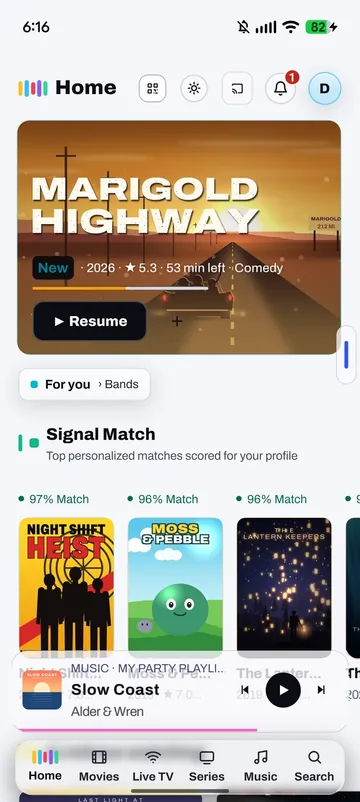
Your library, on your own machine
Everything lives on a computer in your home. No company sits in the middle of your films, and the media server underneath is free, open-source software that runs without us.
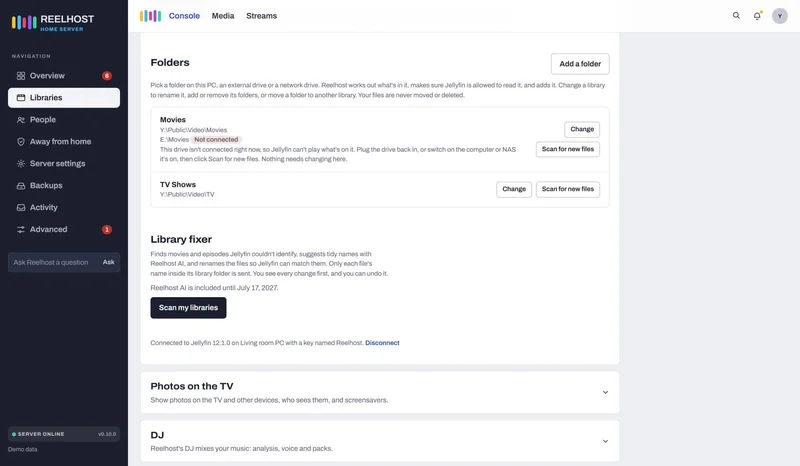
- Your files stay in your own folders
- Video never passes through our servers
- Paid once, not rented
Phone, tablet, TV and web
One sign-in for the whole household. Nobody types a server address: phones scan a QR, and a TV signs in with a short code.
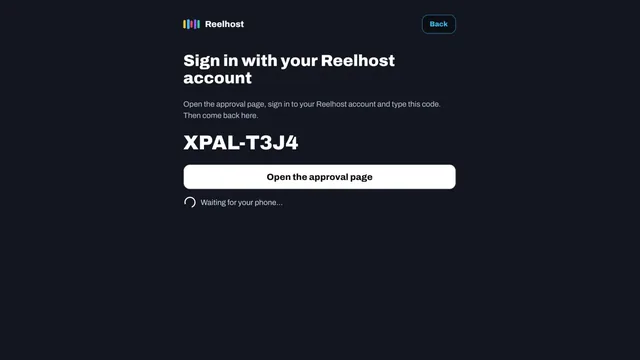
- Android phones, tablets and any web browser today
- A TV signs in with a code, never a password
- Android Auto and CarPlay in the next release
Built for a family, not one person
Everyone gets a profile. Kids get limits. Watch the same film together from different rooms or cities, put the holiday photos on the TV, and keep the family calendar there too.
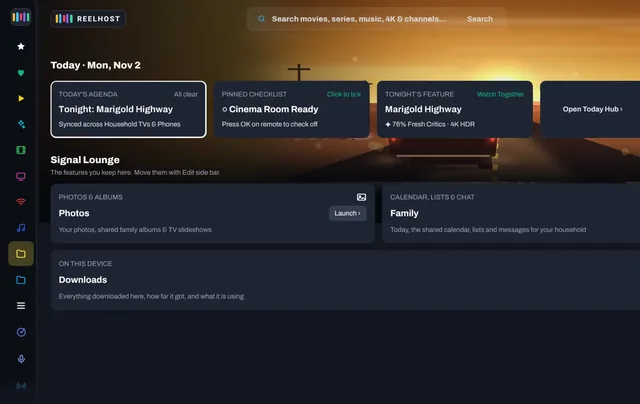
- Profiles, and kids' ratings and hours
- Watch together, in step on every screen
- Photos on the TV and a family calendar
Streaming in minutes.
No server know-how needed. If a step can't be done on your network, Reelhost says so in plain words and shows what to do.
-
1 Install
Install Reelhost on your computer
It sets up the media server and finds your films, shows, music and photos on your drives.
Windows · Mac · Docker on a NAS -
2 Your address
Your web address is ready
Watch from anywhere at your own address, with a real certificate. No port forwarding to do by hand, no VPN, no remote-watching fee. Included on every plan, even Free.
yourname.watchhome.app -
3 Your TV
Sign in on the TV
The TV shows a code. Confirm it on your phone, and the TV is in. Nobody types a password with a remote. Part of Core.
Signed in. Press play.
Everything a streaming service does. On your own computer.
Reelhost works with Jellyfin, the free, open-source media server underneath, and installs and looks after it for you. Each card says which plan it is in.
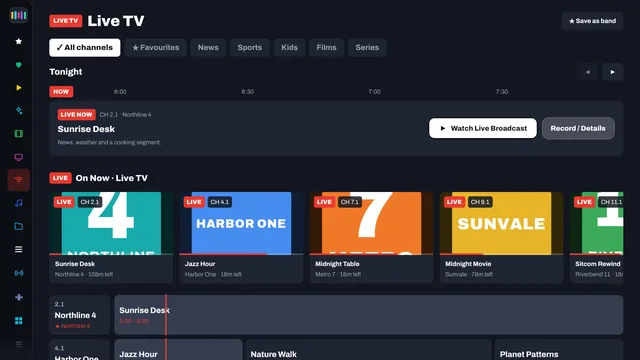
Live TV and recordings
Plug in an antenna tuner, or add free channels that broadcasters stream themselves, with a guide that keeps itself filled. Record a show or a whole series; commercial breaks are found and skipped, and the recording itself is never edited.
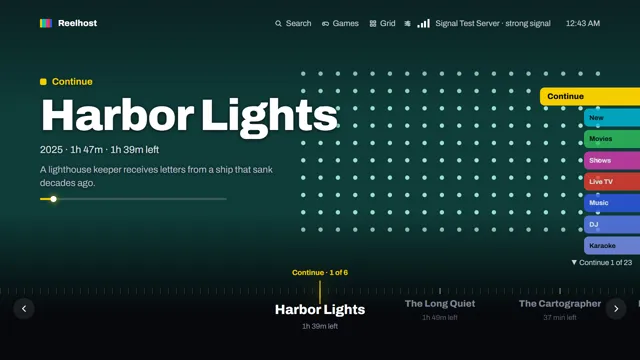
Everything a press away
Home opens on what you were watching, then Signal Match picks. Press left for the side bar: Movies, Series, Live TV, Music, Today and every library.
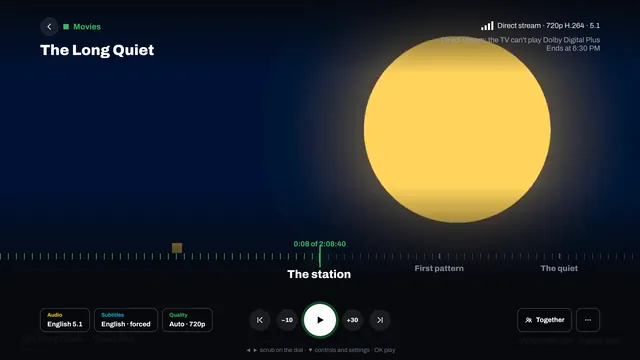
Watch together
Start the same film on everyone's screen at once, at home or across the country, and it stays in step (beta). Calls in the room, to talk while you watch, are in testing.
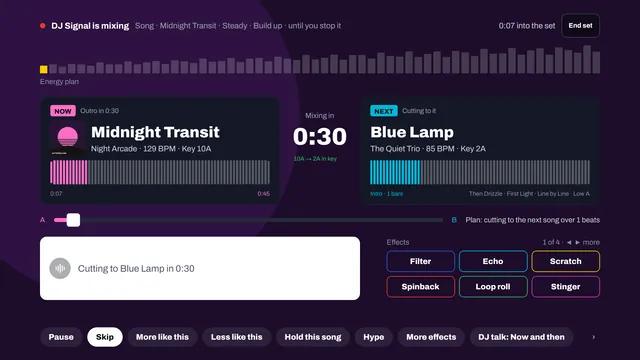
Music, with a DJ
Your music on every screen, and a DJ that mixes your own library: in key, on the beat, with your phone as the remote and requests from the party.
Radio, podcasts and audiobooks
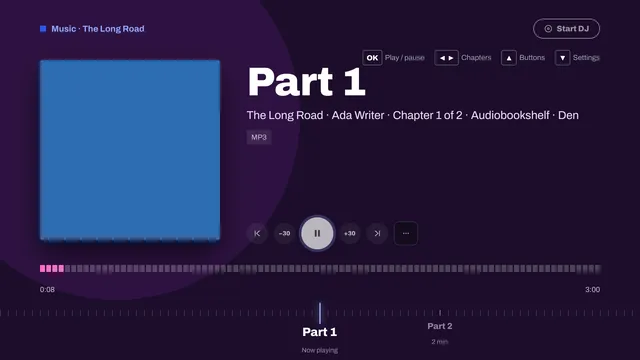
Live internet radio and audiobooks next to your music, with chapters, 30-second skips and your place kept. Audiobooks come from Jellyfin or Audiobookshelf. Podcasts are on Complete.
Photos on the TV
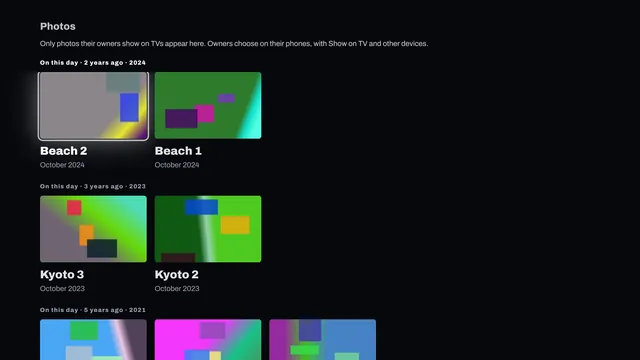
Family photos on the big screen and as a screensaver. Each person's photos stay private until they choose to show them, and sharing links carry no location.
Karaoke
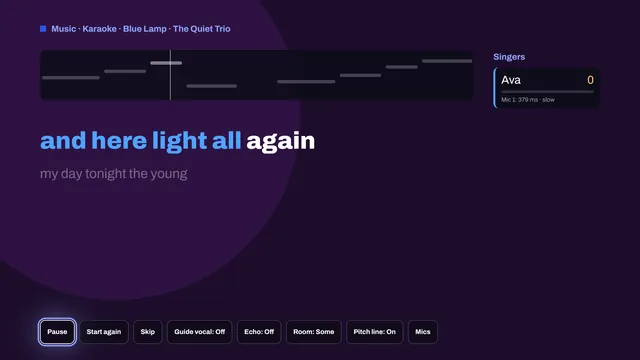
Sing your own songs with timed lyrics, a backing track and scores, with phones as microphones. Karaoke is solo on your phone today; the TV app is coming soon.
Game night
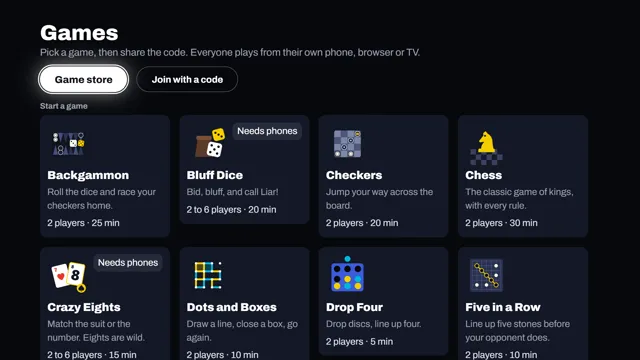
Coming soon: board, card, dice and quiz games on the TV, with each phone as your own private hand. Family far away joins from a link in their browser.
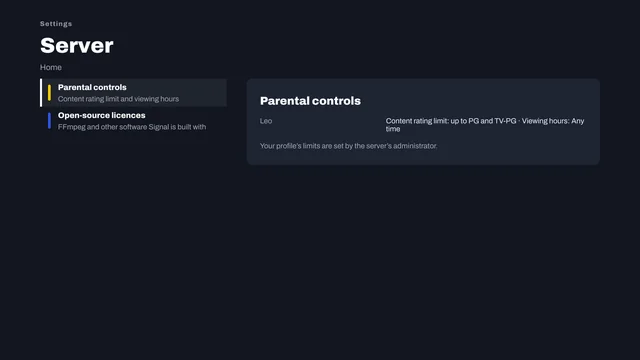
Kids' profiles and limits
A profile for each child with an age rating limit and the hours they may watch. On Complete, kids can ask for a title and a grown-up approves it.
Subtitles for anything
Downloads in your languages, and out-of-step subtitles moved back in time. Nothing to download? Complete writes them on your own computer while it is idle (beta).

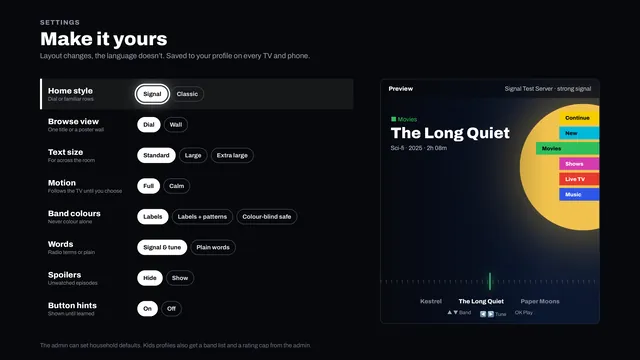
Make it yours
Each person picks how Signal looks: bigger text, calmer motion, colour-blind-safe bands and spoilers hidden. It follows them to every TV and phone.
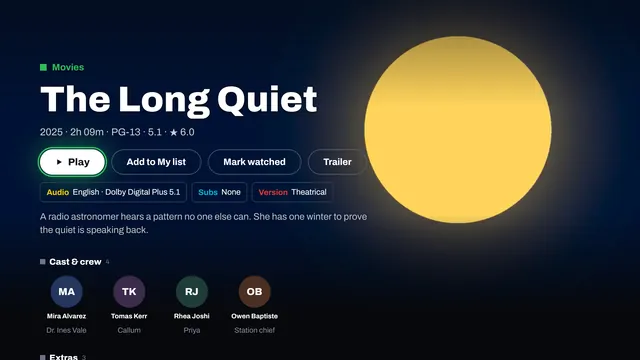
A page for every title
Each film and show has its own page: play it, choose the audio, subtitles and version first, add it to My list, mark it watched or watch the trailer, and see the cast and crew.
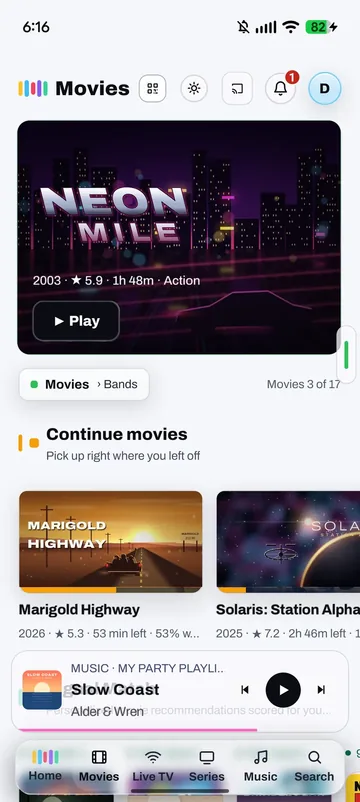
Signal in your pocket.
The same films, music and photos on your phone, at home or away. Signal is free for Android phones and tablets today.
-
FreeWatch anywhereYour own address, yourname.watchhome.app, on every plan. On Core, keep it private with Tailscale instead. -
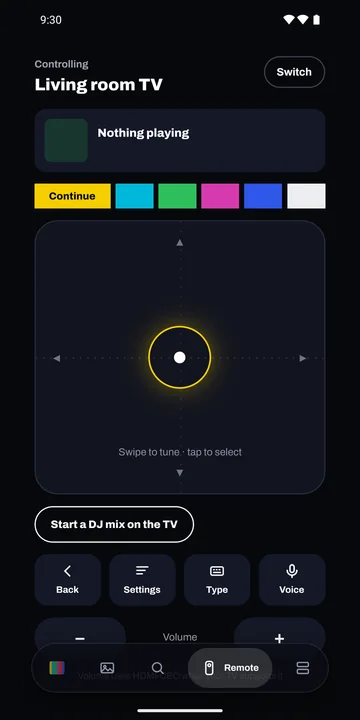
FreeThe TV remoteSwipe to tune, type a search, or say it out loud. Needs Signal on the TV, coming soon. -
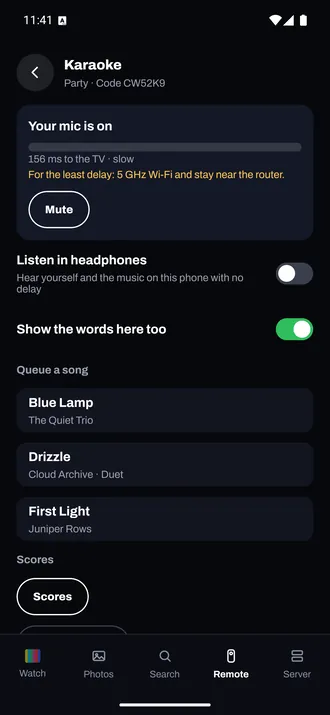
CompleteThe microphoneSing into your phone while the words and scores show on the TV. Needs Signal on the TV, coming soon. -
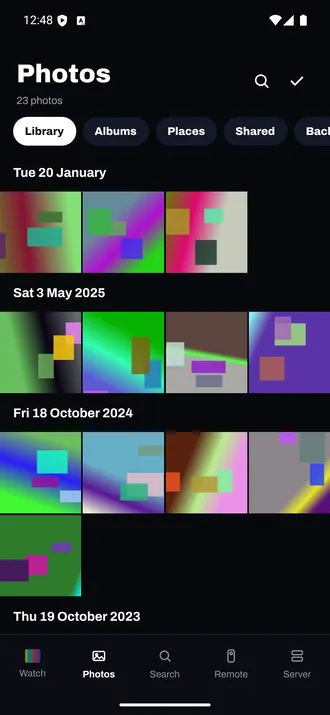
FreeYour photosBrowse by day, album and place, and choose which ones show on the TV.
Everything about your server, in one place.
Reelhost on your computer shows how the server is doing and gives you a button for each job. No settings files, no admin pages to learn.
It keeps itself working. A free check-up says in plain words what's wrong, and the basic fixes are free too; Core adds the rest. Every fix shows what it changes first, backs up the settings, and can be undone. Every check, explained


Your whole library, one press away.
Signal is Reelhost's own app for the TV. Home opens on what you were watching and what Signal Match picked for you. Press left for the side bar: films, shows, live TV, music and the rest.
Own it, instead of renting it.
Reelhost against Plex and Emby as of October 2026. Everything on our side is in the app today. Everything on theirs comes from their own pages or news reports, dated below.
| What you get | Reelhost | Plex | Emby |
|---|---|---|---|
| How you pay | Free to start. Core $24.99 once, Complete $49.99 once. | Plex Pass $6.99 a month, $69.99 a year, $249.99 for five years or $749.99 lifetime. Remote Watch Pass $29.99 a year | Premiere $4.99 a month, $54 a year or $119 lifetime |
| Watching away from home | Free on every plan, at your own address. Private with Tailscale in Core. No pass. | Plex Pass or Remote Watch Pass | Not compared |
| Live TV and recording | In Core. Antenna tuners; record a show or a series. | Free to watch live with a tuner. Recording needs Plex Pass | DVR needs Premiere |
| Skipping commercials | In Core. Breaks found; a skip file is saved beside the recording. | Marked for a one-click skip, or removed. DVR needs Plex Pass | Not compared |
| Your own apps on the TV brands | Signal on Android phones, tablets and the web today. iPhone, iPad and Apple TV in review. Android TV coming. | Roku, Fire TV, Samsung, LG, Apple TV, Android TV, PlayStation, Xbox | Android, Fire TV, iOS, Xbox, PS4. Premiere unlocks |
| One sign-in for the household | A QR for phones, free. A short code for TVs, in Core. No server address to type. | Not compared | Not compared |
| Where your data goes | Video goes straight from your home to your screen. Our servers only keep your address pointed at your home. | Not compared | Not compared |
| Switching from Plex | In Core. Each person's watch history, where they stopped, and collections. Plex is never changed. | Not applicable | Not compared |
How to read it. A tick on our side means it is in the app today; the amber sign means it is partly there. On their side, a green dot means they have it, and an amber tag means they sell it as a paid extra. "Not compared" means we didn't check, not that the answer is no. Plex and Emby are good products with big communities. If you're happy there, stay. Reelhost isn't affiliated with Jellyfin, Plex or Emby.
Sources, checked 27 October 2026. Plex: plex.tv/plans (streaming your server away from home needs a Plex Pass or a Remote Watch Pass; Remote Watch Pass $29.99 a year after June 1, 2026), and Android Authority and 9to5Mac for Plex Pass $6.99 a month or $69.99 a year; 9to5Mac, TechCrunch, Neowin and Plex's own blog for the $749.99 lifetime pass (from July 1, 2026; it was $249.99) and the $249.99 five-year pass (Plex's own price page and blog didn't load for us). Plex's DVR and Live TV FAQ at support.plex.tv (live TV is free to watch with a tuner and antenna; recording needs Plex Pass; commercials are marked for a one-click skip or removed), as summarised in search results because plex.tv blocked our fetch, and Plex's support pages for its apps on Roku, Fire TV, Samsung, LG, Apple TV, Android TV, PlayStation and Xbox. Emby: emby.media/premiere (Premiere $4.99 a month, $54 a year, $119 lifetime; the page lists Emby DVR as a Premiere feature, and apps for Android, Fire TV, iOS, Xbox One and PS4). US list prices; they change.
Buy it once. Keep it.
Core and Complete are paid once and include updates. Try Complete free for 14 days; when the trial ends you drop to Free and nothing is deleted.
15% off your first purchase, thanks to a friend. One discount per purchase.
Free
Your server, set up and on your screens
$0forever
- We set up the media server and find your media
- Your own web address, yourname.watchhome.app, to watch away from home
- Signal on your screens, for one server
- Photos on the TV, private links and shared albums
- The check-up lists every problem
- Basic fixes for ports, discovery and the firewall, with backup and undo
Core
Live TV, your people, your whole library
$24.99once, with your code, was $24.99
- Everything in Free, plus:
- Private watching with Tailscale, and Reelhost on your phone from anywhere
- Live TV, recordings and commercial skipping
- People and kids' profiles, TV sign-in with a code
- Switch from Plex, and the library fixer
- Subtitle downloads and timing fixes
- Network drives, artwork, Skip intro and previews
- Moving to a new computer, with your settings carried across
Complete
The whole household, together
$49.99once, with your code, was $49.99
- Everything in Core, plus:
- Watch together (beta), with calls (in testing)
- Karaoke, the DJ and games (games coming soon)
- Family calendar, shared notes and lists
- AI subtitles (beta), made on your own computer
- Who's watching, and email alerts if the server stops
- Unlimited invites for family and friends
- Reelhost AI for 12 months, then $9.99 a year
Yearly
Everything in Complete, while you're subscribed. Cancel anytime from your account.
$14.99a year, with your code, was $14.99
Ask within 14 days of a payment for a full refund (refund policy). Own Core? Upgrade to Complete from your account and pay only the difference. The same plans on Windows, Mac and Docker, and each license works on two computers. Prices are in US dollars; tax is added at checkout where it applies. You buy plans on this website, never inside a Signal app. Every feature, plan by plan
Frequently asked questions.
Can I bring my Plex library?
Yes. Point Reelhost at the same folders and your films and shows appear. Switch from Plex (in Core) then copies, for each person, what they watched, how many times, when, and where they stopped, plus Plex's collections. Each Plex person's history goes to the person of the same name in Reelhost. It reads a copy of Plex's database, so Plex itself is never changed, it never marks anything unwatched, and one click undoes the copy. It does not copy ratings, playlists, artwork or Plex accounts' passwords. Switching from Plex
What happens if Reelhost the company disappears?
Your server is a program on your own computer, and your films stay in your own folders. The media server underneath is free, open-source software that runs without us, and its own free apps connect to it directly. Your watchhome.app address is different: it is a name our service keeps pointed at your home, so without us it would stop following your home. Signing in with a Reelhost account goes through our service too: without it, an admin would give each person a password in Jellyfin. Private watching with Tailscale doesn't depend on us at all.
Do I have to forward ports or set up a VPN?
No. Reelhost gives your home its own address, yourname.watchhome.app, asks your router to open the port it needs, gets the certificate, and then checks the address works from outside. If your router has that switched off, Reelhost shows you the one rule to add. One honest exception: some internet providers share one address between many homes (called carrier-grade NAT, common with 5G and satellite home internet). There, a web address can't reach your home, so Reelhost tells you and sets up the private option with Tailscale instead.
Which TVs and devices does it work on?
Signal, Reelhost's own app, runs on Android phones and tablets and in any web browser today. iPhone, iPad and Apple TV are in review. Android TV and Google TV are coming soon, and Fire TV, Samsung Tizen and LG webOS are on the way. Until Signal reaches your TV, the server's own free apps for those TVs, and for Roku, work with everything Reelhost sets up, and sign in with a code. On Apple TV, use Swiftfin or Infuse. See the apps
Is it really paid once?
Yes. Core is $24.99 once and Complete is $49.99 once, and both include updates. There is no introductory price and no subscription to keep it working. If you'd rather pay yearly, Yearly is $14.99 a year for everything in Complete while you're subscribed.
Is it safe?
Nothing changes until you review and apply. Before each Apply, Reelhost backs up the settings it's about to change. Afterwards it restarts the server and checks that it answers. If you don't like a change, Restore puts it back from the backup. Reelhost never changes Plex, Emby or your media files, with a few features you choose yourself (the Terms and help pages list them).
Am I locked in?
No. Your media stays in your own folders, and Jellyfin is open-source software that keeps working without Reelhost. Fixes you've applied are settings on your computer, and Reelhost never takes them back if you stop paying. You can remove Reelhost whenever you like and keep Jellyfin. Your watchhome.app address comes with every plan, Free included, so it keeps working.
Jellyfin is free. Why pay for Reelhost?
You don't have to. Jellyfin stays free, and Reelhost's setup, the check, the basic fixes, Signal on one server and your own web address are free too. You pay for time and extras: live TV with a guide that keeps itself current, your network drives, and for Complete the family suite (Watch together, karaoke, the DJ, the calendar). Core and Complete are paid once. Start free and see.
What's in Free, Core and Complete?
Free: we set up your server (install, the recommended settings, your media found), the honest check and basic fixes with backups and undo, your own web address for watching away from home, Signal on one server, and Photos to view on the TV and share. Core adds private watching with Tailscale, live TV and recordings with a guide that keeps itself current, network drives, Send files, the Plex importer and the library fixer, and people, kids profiles and TV sign-in. Complete adds Watch together, games (coming soon), karaoke, the DJ, the family calendar and notes, AI subtitles, monitoring with email alerts and unlimited invites. Every feature, plan by plan
Does my video go through your servers?
No. Video streams straight from your home to your device. Our servers keep your watchhome.app name pointed at your home and sign you in with your Reelhost account. Reelhost never stores your files: the photos you share and the files you send are served by your own server, and Reelhost only carries them.
Which computers does it run on?
The computer that runs the media server: Windows 10 and 11, a Mac with macOS 12 or later (Apple silicon or Intel), or Docker on a NAS (Synology, Unraid, TrueNAS) or a Linux server. On each one you use it from your web browser. It's the same app and the same plans, and each license works on two computers at once, in any mix. See all downloads.
What exactly does it change?
Jellyfin's settings, plus its users, libraries and add-ons when you add people, folders or viewing settings. Outside Jellyfin, only what a feature needs: the plugged-in sleep setting, firewall rules of its own, scheduled tasks of its own, and for a web address, a rule on your router and a small secure proxy on this computer. The Review screen lists every change and what it touches before you apply.
Two features write next to your recordings: commercial skipping adds a small .edl file beside each recording it checks, and automatic deletion, only if you turn it on and confirm, deletes watched recordings by the rules you choose. Deleted recordings can't be recovered.
I use Emby. Can Reelhost help?
Yes, two ways. Reelhost can install Jellyfin next to Emby so you can try it: Emby keeps its port and isn't changed, and the scan stops the two clashing. It also looks after Emby itself: firewall, sleep, and watching away from home at your web address. Features like People and Signal's extras work through Jellyfin. Switching from Emby
What if I stop paying?
Core and Complete are paid once, so there's nothing to stop. On Yearly, every fix you've applied keeps working. Your free setup, the check and the basic fixes keep working too. Yearly features that need our services, such as AI subtitles and email alerts, pause with a plain message. Your web address keeps working, because every plan includes it. Your trial of Complete, if you use one, drops to Free when it ends and nothing is deleted.
Can I get a refund?
Yes. Ask within 14 days of a payment for a full refund. Start free first: you see every change before you pay. See the refund policy.
Is this legal?
Reelhost is ordinary software for running your own media server. It doesn't provide, host, sell or link to movies, shows or music. Your media, and what you do with it, is your responsibility: use Reelhost only with media you have the right to use, on computers and networks you own or manage. The Terms say this in full, and the help page explains that Reelhost never stores your files.
Is Reelhost made by the Jellyfin, Plex or Emby team?
No. Reelhost is an independent app from Wizzered Inc. It works with Jellyfin, which is free, open-source software, and it doesn't include or change Jellyfin's program. Reelhost isn't affiliated with Jellyfin, Plex or Emby.
Find my key
Lost your license key? Enter the email you bought with and we'll send it again. Or sign in to your account to see it, along with your computers, billing and address.
Stop renting your own films.
Install Reelhost on a computer you already own. Start free, and pay once if you want more.
Start free Windows, Mac, or Docker on a NAS. Free to start. No card.-
Windows
For this computerWindows 10 or 11, 64-bit. Signed by Wizzered Inc.
Download for Windows- Run the installer you downloaded.
- If Windows shows a notice the first time, check it says Wizzered Inc., then choose More info and Run anyway. Why
- Open Reelhost, and choose Yes when Windows asks to allow changes.
- Reelhost opens and sets up your server.
-
Mac
For this computermacOS 12 or later, on Apple silicon or Intel. Signed by Wizzered Inc and notarized by Apple.
Download for Mac- Open the .dmg file you downloaded.
- Drag Reelhost to Applications.
- Open Reelhost from Applications. Reelhost opens and sets up your server.
- When a fix changes the firewall or sleep settings, your Mac asks for your password.
-
Docker
For this computerFor Synology, Unraid, TrueNAS and Linux servers, 64-bit Intel, AMD or ARM. Runs next to your Jellyfin container; you use it in a browser.
Get the Docker edition- Get a free key by email, or use your license.
- Sign in with
docker login registry.reelhost.app. - Save compose.yml and run
docker compose up -d. - Open port 8099 on your server from home.
Set up the Docker edition
The image is in Reelhost's own registry, so it needs a key to download. A free key pulls it and runs the check and previews, the same as the free desktop app. The basic fixes are free too; the rest needs a paid plan.
-
Get your free key
We email the key and the two commands to start. Asking again sends the same key. Bought Reelhost? Skip this: your license key and its email work too.
-
Sign in to the registry
On the computer that runs Docker:
docker login registry.reelhost.appUsername: the email the key went to. Password: the key, which starts with RH-.
-
Save compose.yml, then start it
Put it in a folder of its own and change the two lines marked CHANGE to where your movies and shows are. Already run Jellyfin? Point
/jellyfin-configat its config folder and leave out thejellyfinservice.# Reelhost next to Jellyfin. # Change the two lines marked CHANGE, then run: # docker compose up -d # Guide: https://reelhost.app/help/reelhost-docker-nas services: jellyfin: image: jellyfin/jellyfin:latest container_name: jellyfin volumes: - ./jellyfin/config:/config - ./jellyfin/cache:/cache # CHANGE: where your movies and shows are - /srv/media:/media ports: - "8096:8096" restart: unless-stopped reelhost: image: registry.reelhost.app/reelhost:latest container_name: reelhost depends_on: - jellyfin environment: JELLYFIN_URL: http://jellyfin:8096 volumes: # Reelhost's settings and backups - ./reelhost:/data # The same folder as Jellyfin's /config - ./jellyfin/config:/jellyfin-config # CHANGE: same media, same path as in Jellyfin - /srv/media:/media ports: # Reelhost's page: keep it on your home network - "8099:8099" # Only for yourname.watchhome.app (see the guide) # - "443:443" restart: unless-stoppeddocker compose up -d -
Open Reelhost
On a phone or computer on your home network, open
http://your-server:8099. Set Reelhost's own password (not your Jellyfin one), then run the check-up.The full guide: Synology, Unraid and TrueNAS notes, the web address, graphics cards and troubleshooting.